
Where words of Torah take flight™
Virtual Tikkun
Transform your Torah experience.
Virtual Tikkuns are custom-created using your unique Torah scrolls to provide personalized Torah learning experiences for clergy, teachers, and students to ensure Jewish continuity from generation to generation – L’dor v’dor.
Access Virtual Tikkun – The Demo
Virtual Tikkun fits comfortably into today’s digital lifestyles for clergy, teachers and students.
Intuitive learning experiences with task-based Torah journeys
Personalized learning using bookmarking and multiple learning styles
Collaborative learning using data-rich learning tools including in-app audio recording
Torah learning is fun with Dynamic Flashcards and trope color-coding
Virtual Tikkun Audio with fidelity that remains true to your minhag
Simplified Torah management with assignments, invitations and calendaring

Discover Virtual Tikkun
Persona Journeys

Clergy & Educators
Clergy and Educators who are time and resource constrained use Virtual Tikkun 2.0 to provide deep-textured, high-quality personalized teaching at scale.
No need to re-photograph your Torah. Access high-resolution images of any aliya and/or share with students or lay readers.
Reclaim time from your jammed schedule. Use Collaborative Learning to seamlessly collaborate with your students asynchronously, or in real-time, on Virtual Tikkun.
Create audio recordings for students and the community that maintain fidelity with your minhag
Integrating a powerful eLearning Torah platform with images of your unique, handwritten Torah Scroll(s), Virtual Tikkun empowers clergy and educators to:
Provide personalized 1:1 teaching, mentoring and attention at scale
Provide context-specific feedback and resources at every step of the Torah learning process
Support annual, triennial, and custom defined Kria
Assign aliyot to students or lay Torah readers, or invite visitors to leyn
Track and manage student progress – aliya-by-aliya, verse-by-verse

B’nai Mitzvah Students
B’nai Mitzvah students who “live” and learn on today’s digital platforms expect their teachers to interact with them using digital social technology, and for the application to accommodate their personal learning styles and provide constant feedback and encouragement – to create a fun and rewarding experience.
More experienced Baalei Kria (Torah readers) need to easily navigate and bookmark aliyot, learn using Focus-in-Context™ with multiple aliya views, seamlessly Zoom to carefully examine Torah or Chumash text, and record their aliyot, in-part or in-full, so they can assess their progress.
Virtual Tikkun enables B’nai Mitzvah and adult learners to:
Learn within an intuitive, comfortable environment using the style that works best for each learner
Focus on the task at hand with in-app collaborative support and resources from teachers and mentors.
Learn with audio recordings from clergy, tutors and lay Baalei Kria that maintain fidelity to the community minhag (tradition)
Have a blast with new digital Dynamic Flashcards and trope color-coding
Use Virtual Tikkun Audio to self-assess, accelerate progress, and take control to always know where they stand

Clergy, Ritual Directors and Administrators
Clergy, Ritual Directors and Administrators who need to grow the community, empower members, and transparently manage B’nai Mitzvah and Torah ritual calendars, use Virtual Tikkun to:
Calendar Torah reading assignments and keep track of progress week-by-week
Easily assign B’nai Mitzvah portions, mentor students, and track-to-success
Invite any community member or visitor to read Torah
Grow the leyning team/community organically with nominal management overhead
Easily manage licenses as their community evolves
Free Demo – Try Virtual Tikkun Today!
Experience what sets Virtual Tikkun apart from traditional tikkuns (physical or digital) as well as legacy learning/tutoring applications.
Seeing is believing! Experience how custom Virtual Tikkuns of your Sifrei Torah can impact your community and transform the Torah Experience.
Get hands-on with Virtual Tikkun now.
Virtual Tikkun Capabilities
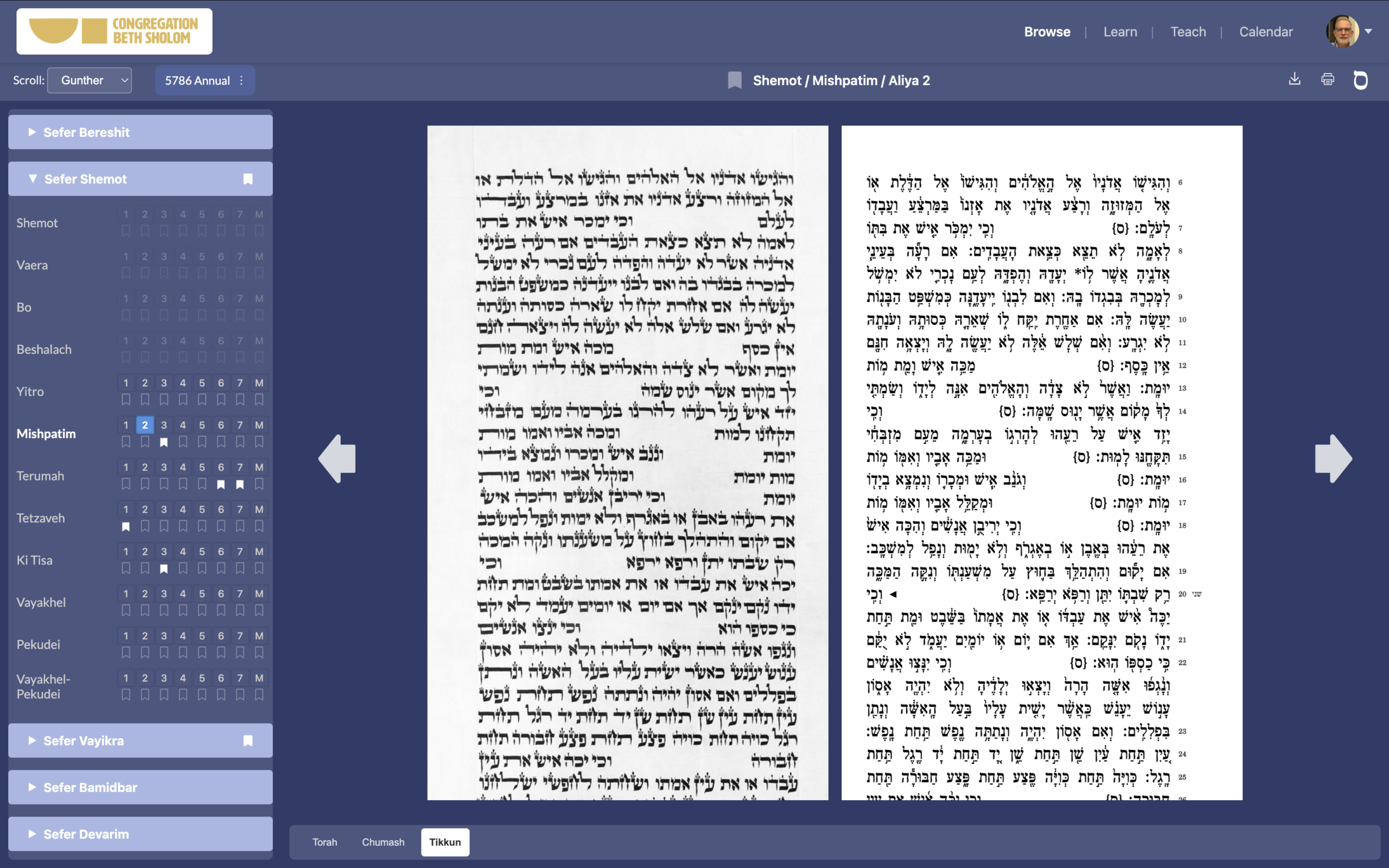
Creating Virtual Tikkuns
Virtual Tikkun originated from two insights.
First, that B’nai Mitzvah students and lay Torah readers benefit greatly when learning and practicing using images of the unique Sefer Torah from which they will read.
Second, providing Virtual Tikkuns for Torah scrolls owned by a synagogue (or other Jewish organization) empowers them to read from the scrolls in community more regularly, rather than “warehousing” them in the Aron Kodesh.
At the heart of the Virtual Tikkun application is the high-resolution photographic reproduction of your Sifrei Torah.
Virtual Tikkun uses a proprietary capture platform designed specifically for Torah scrolls. It is specially designed to ensure the safety of your Torah scroll, with special safeguards for sewn seams, matlesim, and lettering in the context of warped parchment – which poses the biggest challenge to the photographic process.
Virtual Tikkun then processes the column images, optimizing contrast while maintaining contextual condition information, and de-skewing lines where necessary.
Our AI-based software then “reads” the entire Torah, identifies parshiot and aliyot, and automatically aligns the Chumash text line-by-line with each Sefer Torah.
Because every Torah is unique, with variations in letter, word, and line spacing, as well as line heights and margins, the alignment of the Chumash text with the Torah differs from scroll-to-scroll.
Learning with Virtual Tikkun
Virtual Tikkun organizes the Torah Learning experience into task-based journeys organized into Browse, Learn, Teach, Calendar and the new Resource Library.
Browse puts the entire Sefer Torah just a mouse-click away. Based on the choice of the year and Annual, Triennial or Custom kria (reading calendar), users can easily navigate to individual parshiot and aliyot using the Table of Contents, view them in Chumash, Torah, or Tikkun view, and zoom to examine specific phrases or words.
Learn optimizes the learning experience with Focus-in-Context™ that provides multiple learning styles and collaboration features for a specific, highlighted aliya (within the context of the Sefer Torah).
Teach is a dashboard for clergy and tutors in which they can assign aliyot to their students and lay leyners and track their progress, or invite visitors to read Torah.
In Calendar individual users can access and track all their bookmarked aliyot, while clergy or administrators can manage the community Torah reading calendar.
In Library B’nai Mitzvah students and adult readers can access their audio recordings, as well as their teacher’s or those publicly shared by clergy or experienced leyners. Related resources are fully integrated in the Resource Library.
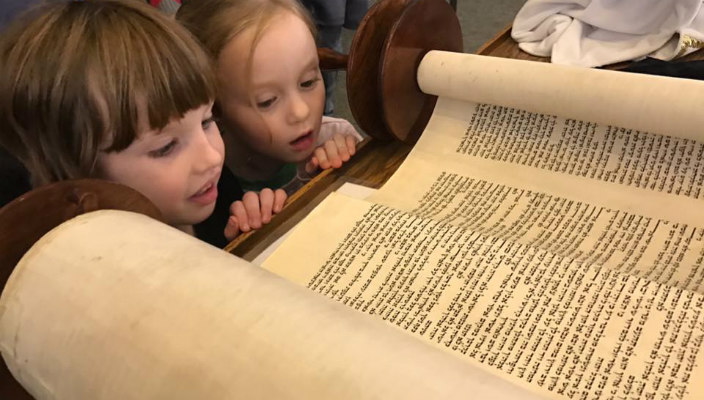
Personalized Learning Journeys
Bookmarks provide a direct route to the aliya within Learn. Users can create personal bookmarks in Browse, or accept invitations from clergy or tutors.
Learn optimizes the learning experience with multiple learning styles adapted to student preference.
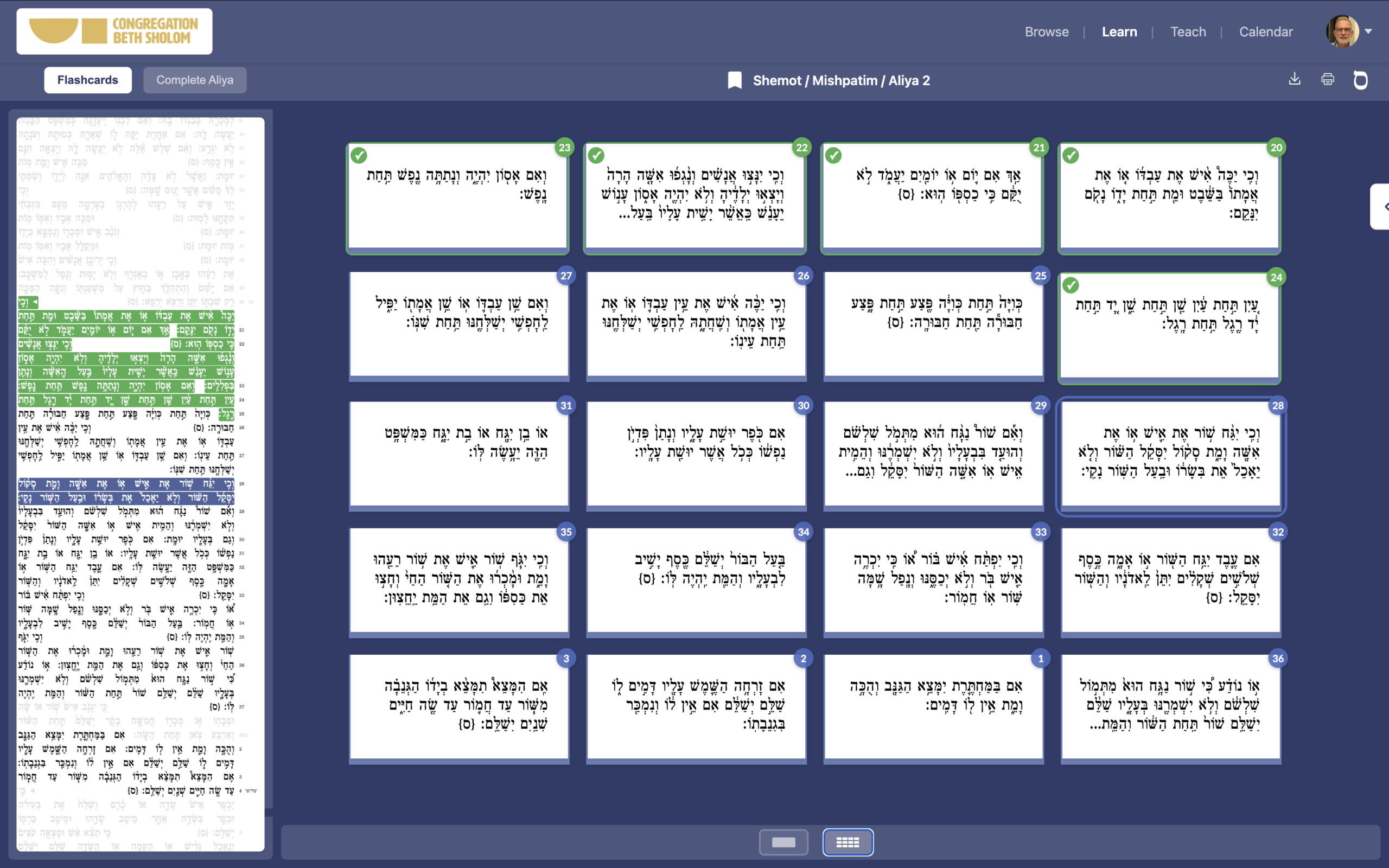
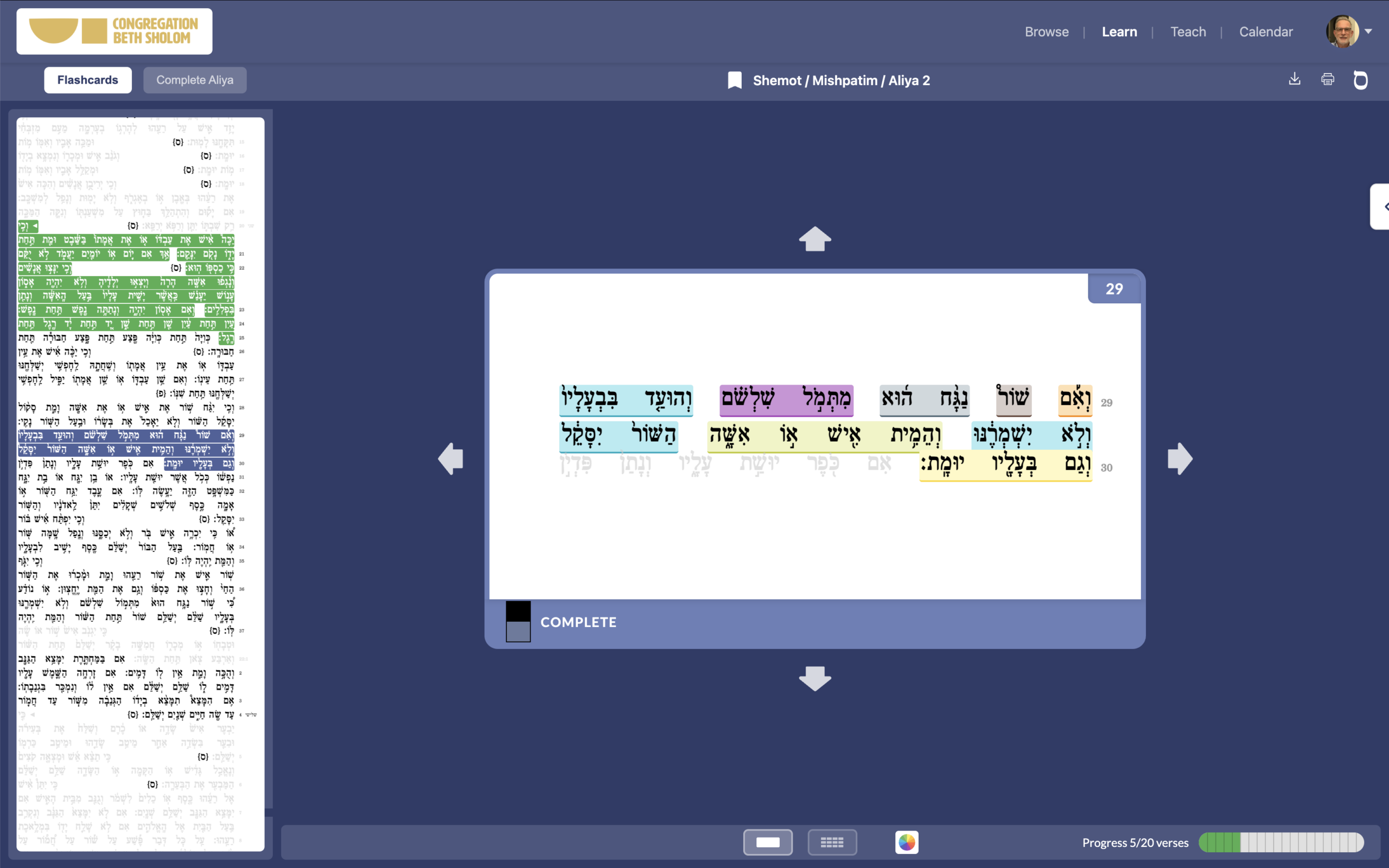
Students can use Dynamic Flashcards, a new feature unique to Virtual Tikkun, to work on individual pesukim (verses). If they prefer they can also learn and practice the entire aliya.
When in Learn students can use trope color-coding to bootstrap their learning for either learning style.
Learn optimizes the learning experience with Focus-in-Context™ within multiple learning styles.
Flashcards are always contextualized within the aliya, while the aliya itself is always embedded within the physical Torah scroll.
Collaboration features are available for individual, highlighted aliya (within the context of the Sefer Torah).
Collaborative Learning
Learn integrates powerful collaborative learning capabilities for students, clergy and tutors.
They work together using built-in messaging, document and file sharing, and the ability to easily make in-app audio recordings with a single click.
The Collaborative Learning tool leverages the very intuitive, familiar messaging metaphor used in iMessage, Slack and other tools, and is available when using Flashcards and/or full aliya learning.
Both students and teachers can add new resources as they collaborate back and forth during the learning process. Audio recording enables students to self-assess or share with their tutors, while tutors can provide recordings that focus on difficult sections.
The application visualizes students’ progress contextual within each aliya, providing feedback and encouragement as they progress
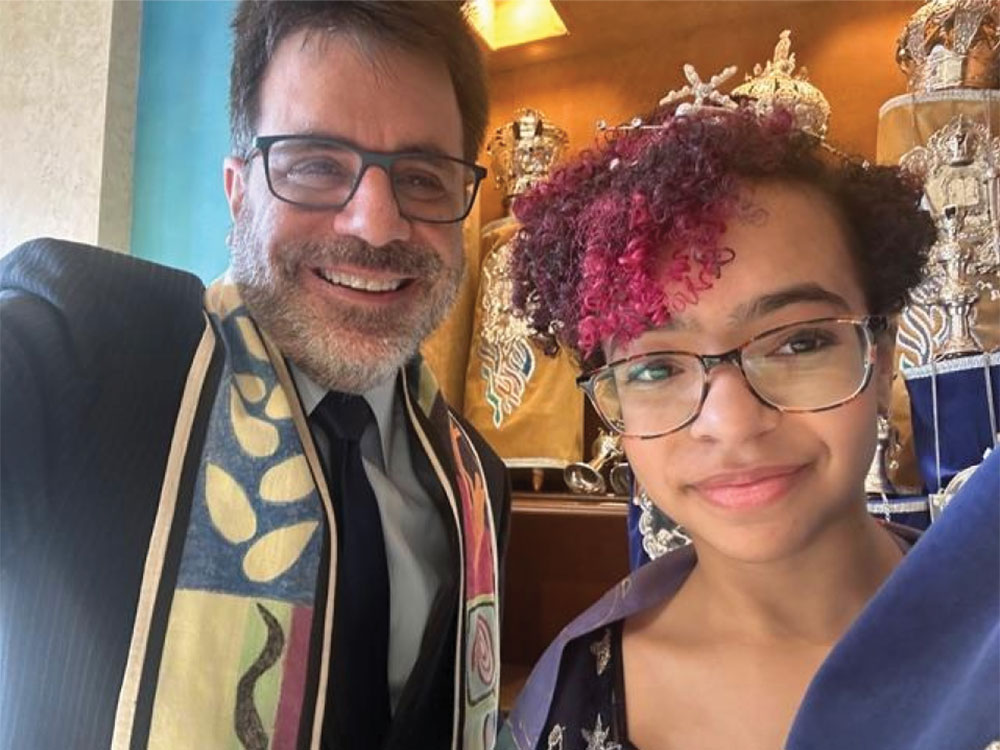
Dynamic Flashcards and Trope Color-Coding
Learning Torah is fun and rewarding with Dynamic Flashcards.
Virtual Tikkun offers the unique capability to learn and practice an aliya verse-by-verse, using Dynamic Flashcards with 3 “faces”: Chumash, Torah, and Tikkun. Users have the option to use whatever face(s) they want.
For example, when learning the aliya the user may flip between Chumash and Torah. When they subsequently return to practice, they may view just the Torah image as they flip card (verse) by card (verse).
For ease of use, learners can select any verse from within the Flashcard grid view (representing all verses in an aliya) to start working with that flashcard
Trope color-coding enables B’nai Mitzvah students who are learning to leyn (read) Torah for the first time, or lay Torah readers who read infrequently, to easily perceive the trope (cantillation) phrases and patterns within their aliyot.
Trope color-coding enables students to easily learn and master their reading, that they then practice using Torah view.
Torah Management & Resource Library
Teacher-student relationships are managed in the Teach dashboard. Clergy and tutors can assign aliyot to students, and visitors can be invited to read specific aliyot – with in-app or email notification.
Student progress can be reviewed and tracked for success.
In the Calendar interface students and readers can review all of their personal bookmarks. Clergy and administrators can manage the overall organizational Torah reading schedule for the organization as well.
Library provides students and readers access to all of tier audio recordings, as well as those created by their tutors and mentors. They also can access public recordings created by clergy or experienced Baalei Kria. Other resource links or files can be added to the Library.
Virtual Tikkun Features
Every member of the community can access their Torah scroll(s) with traditional tikkun capabilities. Personal access unlocks the personalization and advanced capabilities of Virtual Tikkun.
Virtual Tikkun Features
Community Access
Personal Access
Browse
Custom Tikkun using images of your Torah scroll
Torah, Chumash and Tikkun views
Zoom
Year and kria selection
Table of Contents organized by book, parsha and aliyot
Print, Download, Sefaria actions
Personal Bookmarks (create, delete)
Learn
Focus-in-context
Full aliya learning style
Flashcard learning style
− Grid view
− Flashcards (by verse)
− Context and Progress tracking
Trope phrase color coding
Virtual Tikkun Audio
Collaborative learning (students & readers | tutors & mentors)
− Integrated messaging for review/ feedback/ questions
− Share files
− In-app audio recording
− Launch video conference
Teach
Assign students aliyot
View student assignments and progress
Calendar
My Calendar
− View all personal bookmarks
− Delete bookmarks
Community Calendar
− View complete Torah reading calendar by parsha
− Invite/assign Torah readers to unclaimed aliyot
− Filter the community calendar by a specific user
Library
Audio recordings by each user, teachers and students, and clergy and experienced Torah readers
Additional files, links and resources